




Details
CityGlow V1 for X-Plane 12
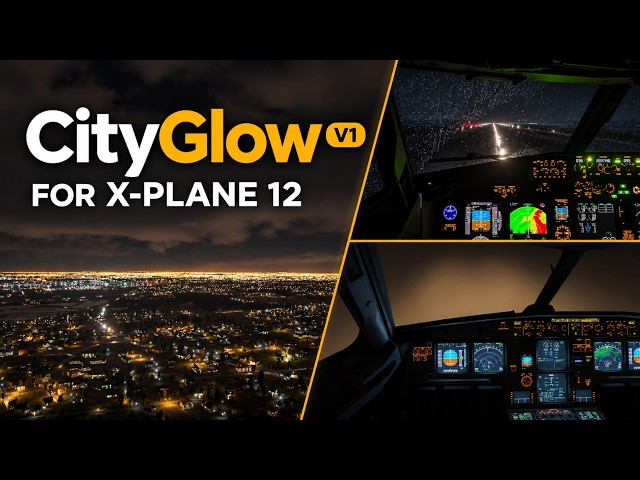
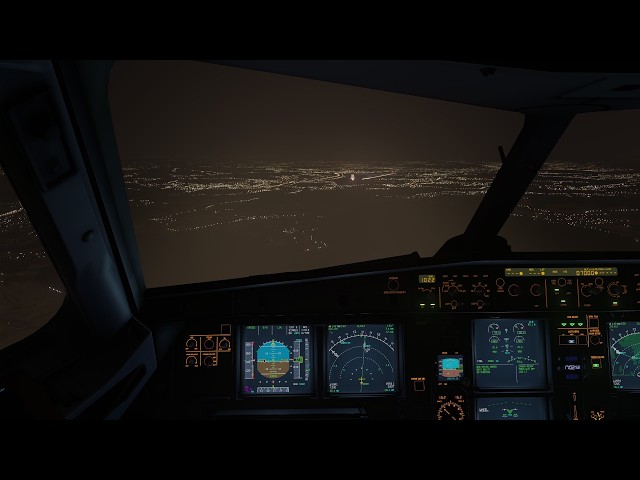
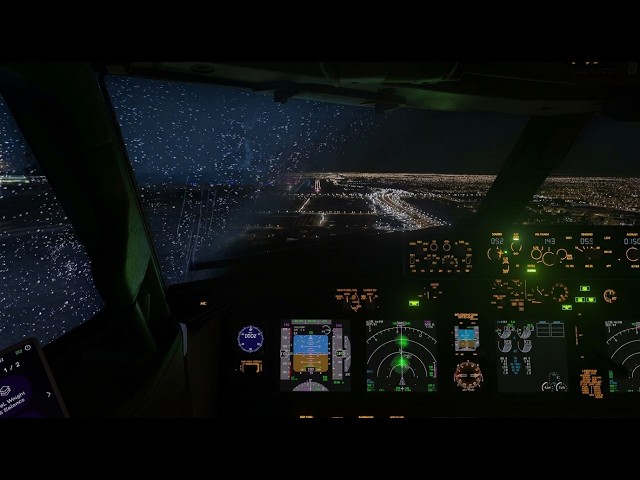
CityGlow is a visual add-on for X-Plane 12 that brings city lighting into the atmosphere. At night, the lights below cast a glow into low clouds and haze. On a foggy approach, your aircraft’s landing lights illuminate moisture ahead. Version 1 also includes optional aircraft-specific rain effects for cockpit and cabin windows.
What CityGlow does
City glow and atmospheric haze. City lights illuminate low clouds and scatter through haze. The effect responds to daylight, visibility, fog and rain, so a clear night and a low overcast produce different results. In Plugins → CityGlow Native, use Glow Colour to choose a preset or set a custom RGB colour. Use Glow Strength to adjust haze and cloud illumination independently from 0% to 200%. Your settings are saved between flights, and Restore Defaults returns both strengths to 100%.
Longer-range street lighting. CityGlow extends the visible street-light network using your installed scenery. Roads and neighbourhoods remain recognisable farther into the distance. Coverage follows the scenery regions you have installed, and CityGlow detects newly installed regions on a normal X-Plane start.
Aircraft lights in clouds and fog. Supported landing, taxi, runway turnoff, navigation, beacon and strobe lights interact with nearby moisture. The effect follows the aircraft’s light positions, directions and flash patterns where supported. Forward beams can illuminate nearby cloud as you approach it, and the effect remains visible in dense cloud during the day with less contrast than at night.
Optional cockpit and cabin window rain. Droplets, water trails and wet film respond to airspeed and aircraft movement. Wipers clear the windshields, and fresh droplets gradually build up again as the aircraft slows to taxi speed. The included rain effects are visual only. Therefore, the sounds come from either default XP or 3rd-party add-ons.
What’s included in V1
- CityGlow Native with city haze, cloud illumination, extended street lighting and aircraft-light effects.
- Windows setup and uninstaller. Setup detects Steam and standalone installations and lets you browse to a custom X-Plane folder.
- Rain Effects setup and uninstaller. Choose which supported aircraft receive the window rain. Setup backs up the aircraft files it changes so the uninstaller can restore them.
- Installation guides and two settings screenshots showing the CityGlow and ITC settings used for the previews.
- Rain effects work with; ToLiss A320 CEO, ToLiss A320neo, ToLiss A321, ToLiss A330-900, ToLiss A319, All LevelUp 737NG Series V2 aircrafts, Zibo 737-800, FlightFactor 777v2: 200ER, 300ER, freighter, no-cabin variants, X-Crafts E195, DeltaWing Simulations ATR 72-60, Felis 747 Classic passenger and 747F and FlightFactor 757-200, 757-300, C-32 and RF
Frequently asked questions
What is the FPS cost?
Expect roughly 6 FPS lower with CityGlow enabled. The cost varies with your GPU and resolution. (My PC specs are: RTX 3070, 64GB RAM, R9 9950X, 2K resolution)
Do I need a lighting mod?
CityGlow works with X-Plane’s default lighting. For the look shown in the previews, install ITC Light Mod v4.7.8 with its Optional Lights files and match the included screenshots. Bay’s Lighting Mod is also an option on its own or alongside the ITC plugin. When two mods replace the same lighting files, the last installed copy takes effect.
Can I use CityGlow with OrthoStreamXP, AutoOrtho, Ortho4XP, or X-Plane Map Enhancement?
Yes. For a more immersive night flight, pair OrthoStreamXP’s Night Lights with CityGlow’s High-altitude street lights. OrthoStreamXP lights towns on the streamed terrain, while CityGlow brings distant street lights into view gradually and keeps recently visible lights ready when you look back. Together, they substantially reduce distracting light pop-in as you approach cities or look around from cruise altitude.
In OrthoStreamXP 1.3 or later, go to Settings → Night → Light the towns at night. CityGlow’s High-altitude street lights are enabled by default under Plugins → CityGlow Native.
With AutoOrtho or Ortho4XP, night texture coverage depends on your installed scenery. X-Plane Map Enhancement offers night textures in its Pro version. Where an area lacks night textures, the distant ground can still look dark while street lights and atmospheric glow remain visible.
Does it work with Sim Heaven?
Yes. All my testing was using Sim Heaven.
Does it work with multi-monitors?
Yes, in version 1.0.1, multi-monitor support has been added.
Tags
Requirements
Operating system: Windows 10 or 11, 64-bit, on an x64 PC
Simulator: X-Plane 12.4.3 or later, Steam or standalone. Compatibility can vary with new simulator betas. I test the update and prepare a patch if needed.
Graphics: A Vulkan 1.3-capable GPU supported by X-Plane 12, with its graphics driver installed
Windows runtimes: Microsoft .NET Framework 4.8 and Visual C++ v14 x64. Setup can download and install missing components.
Storage: Approximately 207 MB download, plus space to extract the package and store locally prepared scenery and shader files; 12 GB would be enough
Customers who bought this product also purchased

€ 20.13
$
USD 22.12
All sales based on Euro. Other currencies shown as reference only.£
GBP 16.86
All sales based on Euro. Other currencies shown as reference only.¥
CNY 147.73
All sales based on Euro. Other currencies shown as reference only.
€ 13.97
$
USD 15.35
All sales based on Euro. Other currencies shown as reference only.£
GBP 11.70
All sales based on Euro. Other currencies shown as reference only.¥
CNY 102.52
All sales based on Euro. Other currencies shown as reference only.
23.99
€ 16.79
$
USD 26.37
All sales based on Euro. Other currencies shown as reference only.£
GBP 20.09
All sales based on Euro. Other currencies shown as reference only.¥
CNY 176.06
All sales based on Euro. Other currencies shown as reference only.
-30%
30-day price low:
€
23.99

10.00
€ 7.00
$
USD 10.99
All sales based on Euro. Other currencies shown as reference only.£
GBP 8.37
All sales based on Euro. Other currencies shown as reference only.¥
CNY 73.39
All sales based on Euro. Other currencies shown as reference only.
-30%
30-day price low:
€
7.00

€ 20.97
$
USD 23.05
All sales based on Euro. Other currencies shown as reference only.£
GBP 17.56
All sales based on Euro. Other currencies shown as reference only.¥
CNY 153.89
All sales based on Euro. Other currencies shown as reference only.
€ 10.00
$
USD 10.99
All sales based on Euro. Other currencies shown as reference only.£
GBP 8.37
All sales based on Euro. Other currencies shown as reference only.¥
CNY 73.39
All sales based on Euro. Other currencies shown as reference only.
29.99
€ 23.99
$
USD 32.96
All sales based on Euro. Other currencies shown as reference only.£
GBP 25.11
All sales based on Euro. Other currencies shown as reference only.¥
CNY 220.09
All sales based on Euro. Other currencies shown as reference only.
-20%
30-day price low:
€
29.99

€ 17.00
$
USD 18.68
All sales based on Euro. Other currencies shown as reference only.£
GBP 14.23
All sales based on Euro. Other currencies shown as reference only.¥
CNY 124.76
All sales based on Euro. Other currencies shown as reference only.