




Details
FWX Heli Flight Dynamics & Rotor Effects: the flight dynamics add-on for every helicopter in Microsoft Flight Simulator 2024, with rotor shadow and rotor blade haptics
The helicopter no longer holds itself in the hover. It comes alive under the pilot and wants to be flown.
What is this package? Three add-ons for helicopters in Microsoft Flight Simulator 2024, with the flight dynamics at their heart. It does not move the camera, it moves the machine: every reaction is generated in the same moment from the simulator's flight data and your control inputs. The simulator's flight model is not replaced, it stays in force. The flight dynamics work on every helicopter, the rotor shadow on seven types, and the rotor blade haptics work through an audio device in your seat.
The flight dynamics: the hover and the flight becomes work again
Over the spot you are aiming for, the machine no longer holds itself there. It wants to be held, and it shows you that every second. Pitch, roll and climb follow the actual attitude of the aircraft, and your control inputs have an immediate effect on its behavior.
Seamlessly on into translational flight
The transition from the hover into translational flight is seamless, with no jump and no switching. Every direction is treated the same way: forward, sideways, backward. The aerodynamic influences and the pilot's influences become clearly noticeable.
Everything happens in the same moment
Airspeed, attitude, control deflection: every reaction is generated continuously from the simulator's flight data and your inputs, at every moment of the flight. Nothing is pre-calculated, nothing is played back.
The simulator's flight model stays in force
We do not replace it. It keeps calculating exactly as intended, our technology reads those values and adds extra motion on top. Everything is executed by the simulator itself. The original data is left untouched.
Tuned to your machine and your taste
You decide how far it goes, and you decide it in flight. That applies to every helicopter in the simulator, including types from other developers.
- Strength infinitely variable from zero to full, at any second of the flight
- Each axis can be switched on individually
- Hover and forward flight can be adjusted separately
- Profiles you can save for each helicopter type
- Tested presets for the simulator's own types, your own values for helicopters from other developers
- The factory setting can be restored per helicopter at any time
Also in the package: the rotor shadow, the shadow add-on for seven types
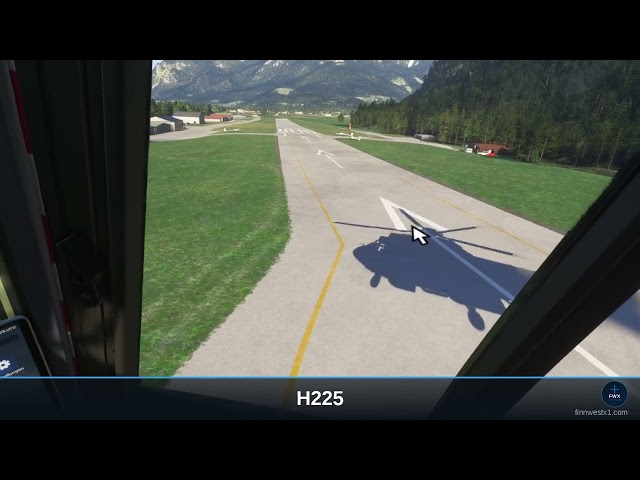
This part brings the shadow of the turning rotor back to where the simulator drops it. On seven well-known types it is there at first and then disappears completely above a certain rotor speed. For exactly those seven the package brings it back, following the rotor speed: on the ground, on the fuselage and on the surroundings, tilting with the machine, main and tail rotor shown separately instead of one dark blob. Each of the seven types has been calibrated individually for it.
- Airbus H125
- Airbus H135 (EC135)
- Airbus H225
- Guimbal Cabri G2
- Robinson R66
- Sikorsky S-64 Skycrane
- Boeing CH-47 Chinook, both rotors
Also in the package: the rotor blade haptics, which make the rotor felt in your seat
The haptics make the rotor felt in your own body. They send the rotor beats as deep pulses to an audio device that works in the seat or on the seat frame and that Windows recognizes as a playback device. So you do not just hear the rotor, you feel it, and every type feels different.
In detail: instead of a uniform hum that feels like a washing machine, you feel every single blade passage. The beat follows the real rotor speed, with two to eight pulses per revolution depending on the type, from the two-bladed R66 to the six-bladed S-64 Skycrane.
All of the simulator's stock helicopters are included automatically, you do not have to set anything up for that. On helicopters from other developers the haptics detect the rotor blades on their own, and anyone who still wants to do it themselves can set them by hand there. Without such an audio device, though, there is nothing to feel. If you do not want to use the haptics, you leave them off and still have the full package.
Based on our market overview, there is currently nothing for MSFS 2024 that makes helicopter flight behavior more immersive and adjustable in this form.
Reviewed by SimFlight, Threshold, MSFS Addons and MSFS Gateway.
What it cannot do
- It does not replace any flight model and does not rewrite any flight model files.
- The flight dynamics work on helicopters only, not on airplanes.
- The rotor shadow works on the seven types listed only, all others are left untouched.
- The UH-1 and the Bell 407 do not need it, they have their rotor shadow out of the box.
- For the haptics you need an audio device in the seat or on the seat frame that Windows recognizes as a playback device. Without such an audio device there is nothing to feel.
- The pulses go to that audio device as an audio signal, not to your speakers.
- This package changes nothing about the simulator's sound.
Works with your other add-ons
- Compatible with ChasePlane and FSRealistic: those two work on camera and sound, this package works on the flight behavior underneath. Camera tools apply their values on top, undisturbed.
- No changes to the aircraft files.
- Runs alongside your own liveries and other utilities.
- Requires Microsoft Flight Simulator 2024.
Operated from the toolbar inside the simulator, in mid-flight
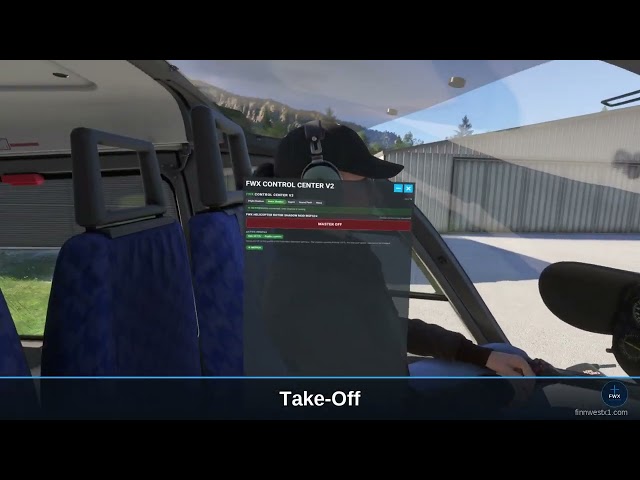
A full control panel sits in the simulator's toolbar, exactly where you open every other panel as well. One click and it is in the cockpit in front of you. In the FWX Manager each of the three add-ons has its own tab, each with a master switch and the sliders below it. Every slider takes effect immediately, without a restart. No second window, no switching to the desktop.
VR compatible
In virtual reality everything works exactly the same, because we move the machine and not the picture. And because the panel sits inside the simulator, it stays reachable with the headset on: adjust in flight without taking the headset off.
Installation and uninstallation
Installation runs through a click-through installer, and the package then starts automatically with the simulator. You can uninstall in two ways: through our own FWX application or through the Windows program list.
Updates
Free updates, new features included. If another helicopter without a rotor shadow appears in the simulator, it is added free of charge with an update.
Also available as a bundle
These three add-ons are also available together with our sound pack, and the sound pack is available on its own:
- FWX HELICOPTER ALL-IN-ONE BUNDLE MSFS24: everything from this package plus the EC135 Real Turbine Sound Mod.
- FWX EC135 REAL TURBINE SOUND MOD MSFS24: the turbine sound of the EC135, works on that type only.
More information: finnwestx1.com
Tags
Requirements
- Microsoft Flight Simulator 2024 (PC, Steam or MS Store)
- Windows 11
For the FWX Helicopter Rotor Blade Haptic:
- A bass shaker, tactile transducer or ButtKicker connected to a separate audio output
- Works with any helicopter in MSFS 2024
For the FWX Helicopter Rotor Shadow Mod:
- One of the seven supported helicopters, listed in the description
For the FWX Helicopter Flight Dynamics:
- Works with any helicopter in MSFS 2024
Recommended Products

€ 25.62
$
USD 29.37
All sales based on Euro. Other currencies shown as reference only.£
GBP 21.98
All sales based on Euro. Other currencies shown as reference only.¥
CNY 196.77
All sales based on Euro. Other currencies shown as reference only.
€ 39.99
$
USD 45.84
All sales based on Euro. Other currencies shown as reference only.£
GBP 34.30
All sales based on Euro. Other currencies shown as reference only.¥
CNY 307.14
All sales based on Euro. Other currencies shown as reference only.
€ 22.99
$
USD 26.35
All sales based on Euro. Other currencies shown as reference only.£
GBP 19.72
All sales based on Euro. Other currencies shown as reference only.¥
CNY 176.57
All sales based on Euro. Other currencies shown as reference only.
€ 8.25
$
USD 9.46
All sales based on Euro. Other currencies shown as reference only.£
GBP 7.08
All sales based on Euro. Other currencies shown as reference only.¥
CNY 63.36
All sales based on Euro. Other currencies shown as reference only.
€ 18.00
$
USD 20.63
All sales based on Euro. Other currencies shown as reference only.£
GBP 15.44
All sales based on Euro. Other currencies shown as reference only.¥
CNY 138.25
All sales based on Euro. Other currencies shown as reference only.
€ 27.49
$
USD 31.51
All sales based on Euro. Other currencies shown as reference only.£
GBP 23.58
All sales based on Euro. Other currencies shown as reference only.¥
CNY 211.13
All sales based on Euro. Other currencies shown as reference only.
€ 29.12
$
USD 33.38
All sales based on Euro. Other currencies shown as reference only.£
GBP 24.98
All sales based on Euro. Other currencies shown as reference only.¥
CNY 223.65
All sales based on Euro. Other currencies shown as reference only.
€ 7.99
$
USD 9.16
All sales based on Euro. Other currencies shown as reference only.£
GBP 6.85
All sales based on Euro. Other currencies shown as reference only.¥
CNY 61.37
All sales based on Euro. Other currencies shown as reference only.